Whistleblower Scheme on the GAIS Platform
Note: This feature is available to paying subscribers only. If you would like access, please contact us to learn more about our subscription options.
In connection with employee engagement or APV (Workplace Assessment) surveys, it can be highly relevant to provide employees with easy access to your company’s whistleblower scheme.
In Denmark, it is a legal requirement for companies with more than 50 employees to have a whistleblower scheme in place.
If you already have a scheme, it can easily be linked directly to your company profile on the GAIS platform.
If you do not yet have a scheme, we can refer you to one of our partners. Please contact us at support@gais.dk for more information.
How to Connect GAIS with Your Whistleblower Scheme
Log in to your company profile on the GAIS platform.
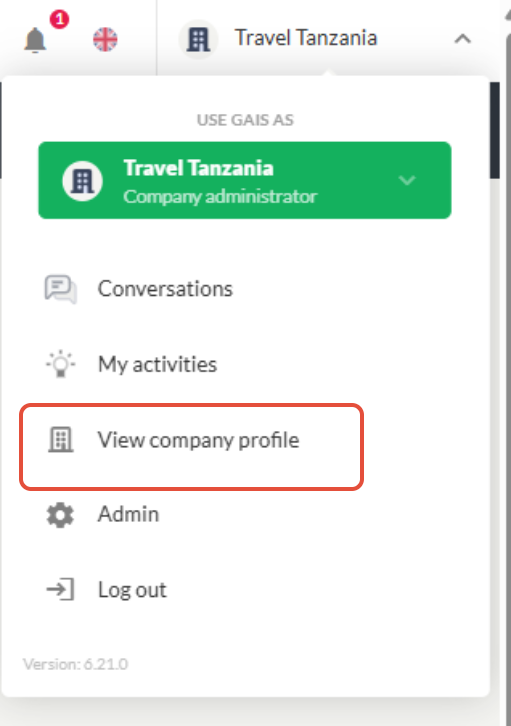
Click the menu in the top-right corner and select “View Company Profile.”
Select Settings.
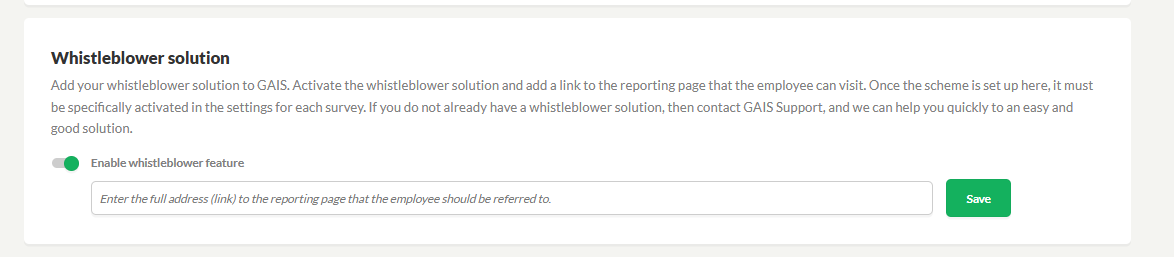
Locate “Whistleblower Scheme” and enable it.
Insert the URL to your whistleblower system in the designated field.
Test the link using the blue link icon.
Click “Save.”
Activate the Whistleblower Scheme on a Survey
Once the whistleblower scheme has been connected in the settings, it must also be activated for each individual survey.
The feature can be activated for both ongoing surveys and drafts.
Open the survey in edit mode.
Go to Settings.
Enable the whistleblower scheme and choose how employees should access it.
You can choose between two display options:
1. Display Whistleblower Link in the Questionnaire
Employees can access the whistleblower reporting via a link displayed at the top of the GAIS questionnaire while completing the survey.
The whistleblower page opens in a new window.
The link is only visible during the survey process and disappears once the survey has been submitted.
2. Display Whistleblower Link in the Employee’s GAIS Report
Employees can access the whistleblower reporting via a link displayed at the top of their personal GAIS report.
The whistleblower page opens in a new window.
The link is available after the survey has been completed and remains accessible from the personal report as long as the scheme is active.
You may activate either one or both options.
Please note that the whistleblower scheme must be activated manually for each survey, and settings can vary from survey to survey.
Was this article helpful?
That’s Great!
Thank you for your feedback
Sorry! We couldn't be helpful
Thank you for your feedback
Feedback sent
We appreciate your effort and will try to fix the article